Backup Cisco Switches and Routers
August 15, 2021
In order to backup Cisco IOS switches and routers you must have the prerequisites configured. The procedure to backup cisco firewalls is the same as below.
Prerequisites –
- Have a TFTP server configured and ready for use.
- Configured the device with SSH/Telnet.
Time needed: 2 minutes.
With the perquisites configured, it will hardly take a minute or two to backup the running or startup config of the device.
- SSH/Telnet into the device
to ssh, start a cmd and type ssh username@deviceip or use putty - Enter the following commands –
enter privileged EXEC mode by issuing enable
then type copy running-config tftp
type the TFTP server address
enter the desired file name and press Enter.
Following is an example of how the terminal should look like at this point.
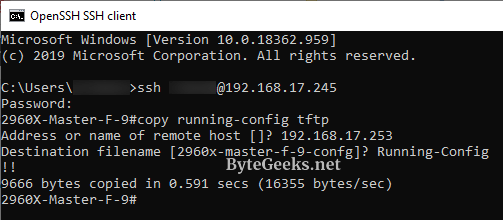
That’s it, you are done taking backup of the device’s running or startup configuration.
About The Author

Redwan
Just your average IT guy talking about IT stuff.