Change CRS309-1G-8S+IN to SwOS
October 23, 2025
Starting from RouterOS version 7.17, you will need to enable “changes” on routerboard to allow the switch to boot to SwOS. Issue the following commands to change CRS309-1G-8S+IN to SwOS.
Before running the commands below, make sure your switch is in advanced mode, run
system/device-mode/printand ensure mode: advanced is there, else set the device mode to advanced bysystem/device-mode/update mode=advancedand reboot the router
Steps to follow –
- Update routerboard setting
system/device-mode/update routerboard=yes - Power cycle the switch or reboot by pressing the reset button (better to just turn off power)
- Set boot-os to SwOS
system/routerboard/settings/set boot-os=swos - Reboot the switch
system/reboot
Reboot, yes? [y/N]:
y
The switch will reboot to SwOS.
Please note: When booting to SwOS, it will not make a beep to confirm boot success. You can confirm if it was successful by refreshing Winbox neighbours.
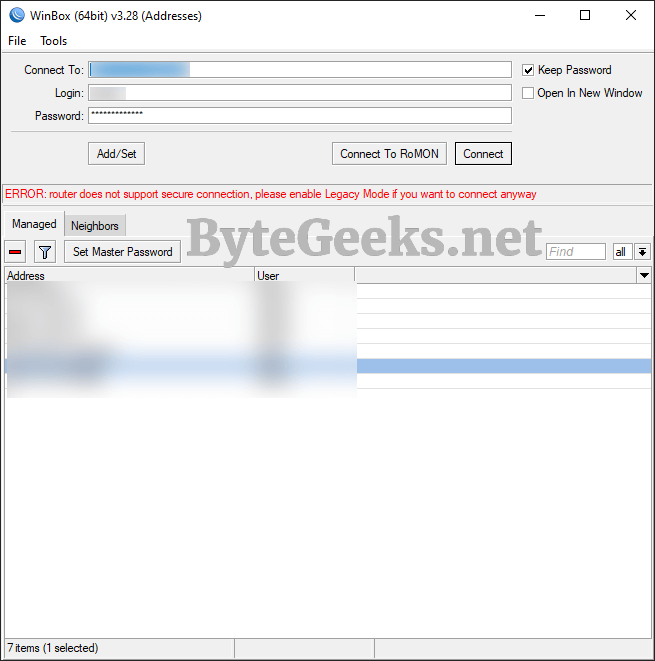
ERROR: Router does not support secure connection, please enable Legacy Mode if you want to connect anyway
Installing and Configuring a TFTP Server

Email Alerts on Mikrotik
About The Author

Redwan
Just your average IT guy talking about IT stuff.