How to install Mono in Raspberry Pi
What is mono? In short Mono is a software platform designed to allow developers to easily create cross platform applications part of the .NET Foundation. You can read more about it here. Well this article isn’t about the “What” it’s about the “How” to install mono in raspberry pi.
Mono isn’t available to download from the default repository of Raspberry Pi, therefore, we have to add it. The repositories are different for the version of raspbian you’re running. To check your raspberry pi OS version run the following command.
cat /etc/os-releaseRun the following command to install the key that will authenticate the resources we download
sudo apt install apt-transport-https dirmngr gnupg ca-certificatessudo apt-key adv --keyserver hkp://keyserver.ubuntu.com:80 --recv-keys 3FA7E0328081BFF6A14DA29AA6A19B38D3D831EFNow that the key is installed we will need to add the repository. As we mentioned earlier the repositories are different for the version your Pi is running on. Mono offers repositories for Raspbian 10 (armhf) and Raspbian 9 (armhf). Copy the one according to your Raspbian version.
echo "deb https://download.mono-project.com/repo/debian stable-raspbianbuster main" | sudo tee /etc/apt/sources.list.d/mono-official-stable.listecho "deb https://download.mono-project.com/repo/debian stable-raspbianstretch main" | sudo tee /etc/apt/sources.list.d/mono-official-stable.listOnce the repository is added, we need to update the system so that is flushes the cache and rebuilds it.
sudo apt updateYou should see the repository has been reached and updated to the system. Refer to the image below.
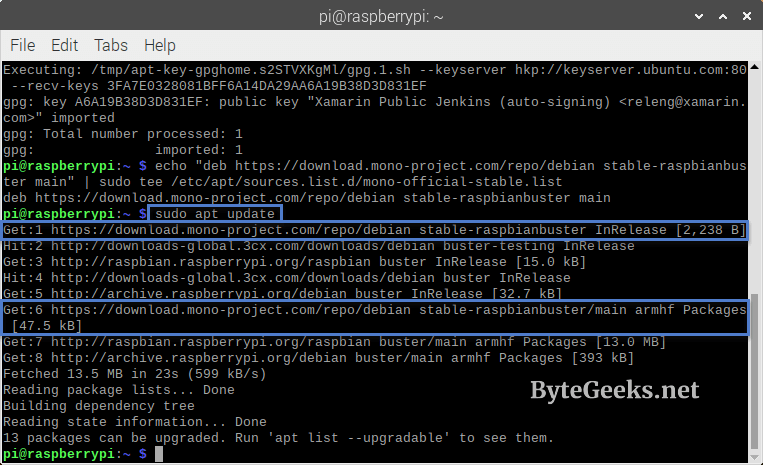
Now that we have added and verified the repository. A one line command should install mono on your Raspberry Pi.
sudo apt install mono-complete That is it. We are done with installing Mono on our Raspberry Pi. If you like this article, you may love these.
About The Author

Redwan
Just your average IT guy talking about IT stuff.